Meeting rooms
Yealink MeetingBoard Pro: the all-in-one board for the meeting room
Touch display, three cameras, 16 microphones and loudspeakers in one device: what the Yealink MeetingBoard Pro can do, which sizes there are and where the limits are.
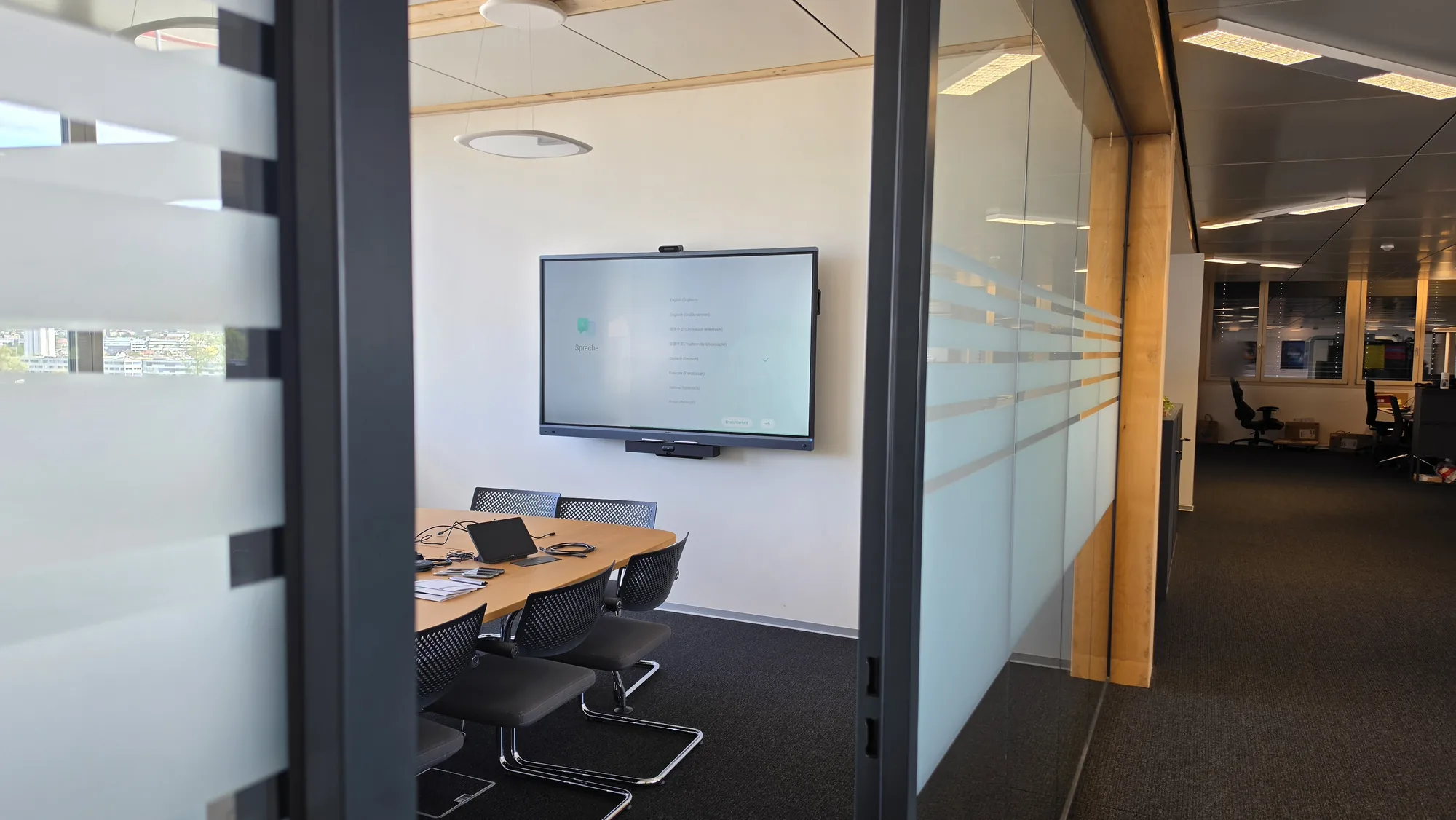
The Yealink MeetingBoard Pro is an all-in-one board for the meeting room: touch display, three cameras, 16 microphones and loudspeakers are packed into one device. It comes in 65, 75 and 86 inches, runs Android 13 and is intended for Microsoft Teams and Zoom. New alongside it is the MeetingBoard C, which Yealink showed at ISE 2026.
What is the Yealink MeetingBoard Pro?
The MeetingBoard Pro combines screen, video conferencing system and digital whiteboard. You do not need a separate camera or table microphones to get started. Yealink presented the board on 30 April 2025 and states worldwide availability through authorised partners. No successor is known (as of November 2026): at ISE 2026 and InfoComm 2026, Yealink still showed the Pro as its main product.
What is inside the board: camera, microphones and touch
- Picture: 3840 x 2160 pixels, anti-glare, 400 cd/m², 60 Hz
- Camera: three cameras with 50 MP each, one wide angle (98.2 degrees horizontal) and two telephoto, 8x digital zoom, electric privacy cover
- Framing: Auto Framing, speaker tracking, IntelliFocus and Video Fence
- Audio: 16 MEMS microphones, full duplex up to 12 metres, stereo loudspeakers with 30 W rated power
- Touch: infrared with 20 touch points, 21 ms latency (measured in the Yealink whiteboard), four pens included, two people can write at the same time
- Connections: HDMI input and HDMI output, 3 x USB-A, USB-B for touch, 2 x Gigabit LAN, OPS slot, Wi-Fi 6 and Bluetooth 5.1
You share content via HDMI, AirPlay, Miracast or the Yealink Wireless Presentation Pod. The data sheet lists no USB-C port.
Which sizes are there?
The MeetingBoard Pro comes in three sizes. Yealink assigns a number of people to each.
| Model | Size | People according to Yealink | Net weight |
|---|---|---|---|
| MeetingBoard 65 Pro | 65 inches | 1 to 6 | 40 kg |
| MeetingBoard 75 Pro | 75 inches | 6 to 12 | 52.2 kg |
| MeetingBoard 86 Pro | 86 inches | 12 to 20 | 65.6 kg |
Microsoft is more cautious: in its list of certified devices, all three sizes appear as solutions for medium-sized rooms of 4.5 x 6 metres. The board can be extended with Yealink accessories, such as the MB-12X Pro camera module (12x optical zoom), wired or wireless extension microphones and a ceiling microphone.
Does the MeetingBoard Pro work with Teams and Zoom?
Yes. According to the data sheet, the board is certified for Microsoft Teams and Zoom. Microsoft lists all three sizes as Teams Rooms on Android, with Android 13 and certification until 15 August 2028. For Zoom, the information is based on the manufacturer's data sheet.
There are also two other operating modes:
- General Mode (BYOM): you bring the meeting on your own laptop.
- USB mode: the board acts as screen, camera and audio device for your own laptop.
If you want Windows, you add an OPS module. Yealink offers the MCore-OPS and MCore-OPS-G2 for this, and the versions with a T at the end are certified for Teams.
What is the new MeetingBoard C?
Yealink showed the MeetingBoard C as a new product at ISE 2026. It is based on Google EDLA, so it comes with Google Play Store, Google Meet and Chrome, and is intended for use with your own laptop. Confirmed are a 50 MP wide angle camera, 8 microphone arrays with full duplex up to 8 metres and a 4K display. There are two sizes: 65C for 1 to 6 people, 75C for 6 to 12 people and open zones.
A lot remains open. No market launch date is confirmed, nor the Android version or any certification for Teams or Zoom. Whether and since when the MeetingBoard C is available therefore remains open. If you need a certified Teams room today, the Pro is the confirmed choice.
Which rooms does it suit?
Yealink intends the MeetingBoard Pro for anything from small rooms to large meeting rooms and for open zones. It fits when:
- you want to equip a room with a single device on the wall or on a rolling stand
- your business works with Teams or Zoom
- besides video conferencing, people also sketch on the whiteboard
With very long tables, a single board reaches its limits. There it is worth looking at extension microphones or a system with separate components.
Limits and requirements
- Licence: Yealink's documents that we checked give no information on whether and which licence is needed for Teams Rooms or Zoom Rooms. Clarify this before ordering.
- Whiteboard in Teams mode: content cannot be saved on the device, only in the Teams client.
- Shared content runs in meetings at a maximum of 4K at 15 frames per second.
- The wall mount is not included.
- The first generation 6X and 12X PTZ cameras no longer fit. The Pro needs the MB-12X Pro module.
What matters in planning and installation
At 40 to 65.6 kg, the board is no lightweight. The wall has to carry it, and lightweight walls need reinforcement. Alternatively, Yealink offers rolling stands. Plan power and network behind the device, and a cable is more stable than Wi-Fi. For size and mounting height, the rules of thumb in the article screen size, distance and height help. Do not underestimate the acoustics: in a reverberant room, speech intelligibility suffers even with 16 microphones. IMAGEMEDIA from Solothurn plans, supplies, installs and supports meeting room technology and digital signage throughout Switzerland.
More on this: meeting rooms and conference technology and hybrid meeting rooms: what really matters.

In person
Philip Fiumi
Managing Director
Questions about Meeting rooms?
Write or call. We’ll advise you with no obligation and get back to you within one working day.
Matching service
More services.
More articles
News

Samsung MagicINFO is being discontinued: deadlines and the move to VXT
Samsung is replacing MagicINFO with the cloud CMS VXT. Which deadlines are documented, what VXT 4.0 can do and how to plan your migration.
Logitech Rally Bar 2: the new video bar and which bar suits which room
Logitech has unveiled the Rally Bar 2, successor to the Rally Bar and Rally Bar Mini. What is new and which Logitech bar belongs in which room.
Samsung Flip 2026: the new WMFX series and who it is worth it for
The Samsung Flip WMFX is a digital flipchart in four sizes from 55 to 85 inches. What is new, what it suits and why you need accessories for video conferencing.